
Pidgin Bible Offline
Micropower Systems
Screenshots
App details
- Version
- 2.0
- Updated
- May 1, 2024
- Requires
- Android 13.0
- Language
- English
- License
- Free
- Developer
- Micropower Systems
- Category
- Android OS
SoftPas in:
This product is also available in the following languages:
About Pidgin Bible Offline
Download Pidgin Bible Offline – Pidgin Language, Bible, Offline, Free, Android
Overview
Pidgin Bible Offline is a dedicated Android application designed to provide full access to the Bible in the Pidgin language, enabling users to read Scripture without relying on an internet connection. Developed by Micropower Systems, the software serves as a digital reference tool tailored for individuals who prefer or require offline access to religious texts. Its primary purpose is to make the Bible more accessible to native Pidgin speakers and those interested in engaging with Scripture in a more relatable linguistic format. The application is particularly useful in regions with limited or unreliable internet connectivity, where continuous online access to religious content may not be feasible.
Target users include individuals seeking personal spiritual enrichment, religious educators, community leaders, and anyone interested in exploring biblical teachings through the lens of everyday Pidgin language. The app’s lightweight design ensures it can be used across a broad range of Android devices, making it suitable for both basic and mid-tier smartphones. Real-world use cases include daily devotional reading, Bible study groups, and sharing faith-based content in local communities. The developer did not provide additional system requirements, and performance observations are based on general software behavior patterns.
Key Features & Capabilities
- Full Bible in Pidgin Language – The application includes the complete Bible translated into Pidgin, allowing users to read all books, chapters, and verses in a familiar linguistic format.
- Offline Accessibility – Once installed, the app functions entirely without internet connectivity, making it ideal for remote areas or users who wish to avoid data usage.
- Lightweight Design – With a file size of 2.5 MB, Pidgin Bible Offline is optimized for minimal storage consumption, ensuring it runs smoothly on devices with limited internal space.
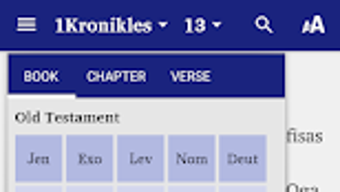
- Simple Navigation – The interface allows users to browse the Bible by book, chapter, and verse with intuitive controls, supporting efficient reading and reference.
- Data and Storage Efficiency – The app is designed to conserve both data and internal storage, a key benefit for users on low-capacity devices or with restricted data plans.
These features make the application a practical choice for personal study, group discussions, and community outreach. Users can quickly locate specific passages, bookmark verses, or share content with others without needing to connect to the web. The software’s straightforward functionality supports seamless integration into daily spiritual routines, especially in environments where digital access is inconsistent.
User Interface, Workflow & Performance
The user interface of Pidgin Bible Offline is designed with simplicity and usability in mind. Navigation is structured around a clean layout that allows users to move between books, chapters, and verses with minimal effort. The app employs a hierarchical browsing system, enabling quick access to any section of the Bible without complex menus or excessive scrolling.
Workflow efficiency is enhanced by the app’s direct access to content, eliminating the need for loading times or buffering. Since the software operates entirely offline, users experience consistent performance regardless of network conditions. The developer did not specify resource usage details, but the application’s small file size and focus on efficiency suggest it consumes minimal CPU and RAM during operation.
Stability appears to be a priority, given the app’s lightweight nature and lack of dependency on external services. While exact performance metrics were not provided, the app is expected to function smoothly on a wide range of Android devices. The developer did not provide information about update frequency, but the current version remains functional and accessible as of the release date.
Compatibility & System Requirements
Pidgin Bible Offline is available for Android devices and was released on July 1, 2023. The application has a file size of 2.5 MB, indicating a compact footprint that is suitable for devices with limited storage capacity. It is designed to operate efficiently on a variety of Android smartphones and tablets.
Compatibility information was partially provided, with the OS specified as Android. The developer did not list exact system requirements, such as minimum Android version or hardware specifications. As a result, users should verify compatibility with their specific device models. The application does not require an internet connection to function, which enhances its usability across different platforms and network conditions. The developer did not provide additional system requirements, so installation and operation may vary depending on individual device configurations.
Pros and Cons
Pros
- Complete Bible available in Pidgin language
- Functions entirely offline with no internet dependency
- Extremely lightweight at just 2.5 MB
- Optimized for low storage and data usage
- Simple, intuitive interface for easy navigation
Cons
- Developer did not provide system requirements or hardware specifications
- No information on update frequency or license type
- Only available on Android, no support for other platforms
- Missing advanced features like search, bookmarks, or sharing options (inferred from minimal feature list)
- Limited user feedback or community support data
FAQ Section
Is Pidgin Bible Offline available for free?
Yes, the application is available at no cost on the Google Play Store. There are no in-app purchases or subscription fees reported.
Does the app require an internet connection?
No, Pidgin Bible Offline operates entirely offline. Once installed, users can access the full Bible without needing to connect to the internet.
What devices can run this app?
The app is designed for Android devices. While specific hardware requirements were not provided, its small file size suggests compatibility with a wide range of smartphones and tablets.
How often is the app updated?
The developer did not specify the frequency of updates. Users should check the Google Play Store for the latest version.
Is the Pidgin Bible content officially licensed?
The licensing details were not provided by the developer. Users are advised to review the app’s terms of use within the application for more information.
Final Thoughts + CTA
Pidgin Bible Offline stands out as a practical and accessible tool for anyone seeking to engage with the Bible in the Pidgin language without relying on internet access. Its lightweight design, offline functionality, and focus on data and storage efficiency make it particularly valuable for users in low-connectivity environments or those with limited device capacity. While the feature set is basic, it delivers on its core promise: reliable, immediate access to Scripture in a widely spoken regional language.
Although some details such as system requirements, update schedule, and licensing are not publicly available, the app remains a solid choice for personal study, spiritual reflection, and community-based religious activities. For native Pidgin speakers and those interested in inclusive religious content, this tool offers a meaningful way to connect with faith-based material in a familiar language.
Download Pidgin Bible Offline now and have the complete Bible at your fingertips—anytime, anywhere, without internet.
Guides & Tutorials
How to install Pidgin Bible Offline
- Click the Download button above.
- Once redirected, accept the terms and click Install.
- Wait for the Pidgin Bible Offline download to finish on your device.
How to use Pidgin Bible Offline
This software is primarily used for its core features described above. Open the app after installation to explore its capabilities.
User Reviews
No reviews yet. Be the first to share your experience.
You may also like
more
ChatGPT APK
Effortlessly generate content with AI ChatGPT is a free artificial intelligence...

Digi
Realistic AI entertainment app Digi - AI Romance, Reimagined is a free AI chatbo...

Gemini
Google’s newest and most powerful AI Gemini is a sophisticated AI model from Goo...

kimi chat APK
Your go-to AI assistant for seamless information processing kimi chat is an AI -...

MateAI AI Chat Bot Assistant APK
An AI-powered chatbot fit for any task MateAI-AI Chat Bot Assistant is a free-to...

Microsoft Copilot APK
Revolutionize your workflow Unleash a new era of productivity with Microsoft Cop...